
Building a WordPress plugin using only AI prompts
After participating in the AI Speed Build Challenge with Ryan and Jamie yesterday, I got the bug to push the limits of AI—specifically Cursor—despite my very limited skills in prompting.
Objective
I wanted to explore whether AI could create a WordPress plugin that adds a style variation switcher to a site’s front end, similar to the theme picker on the Shadcn UI website.
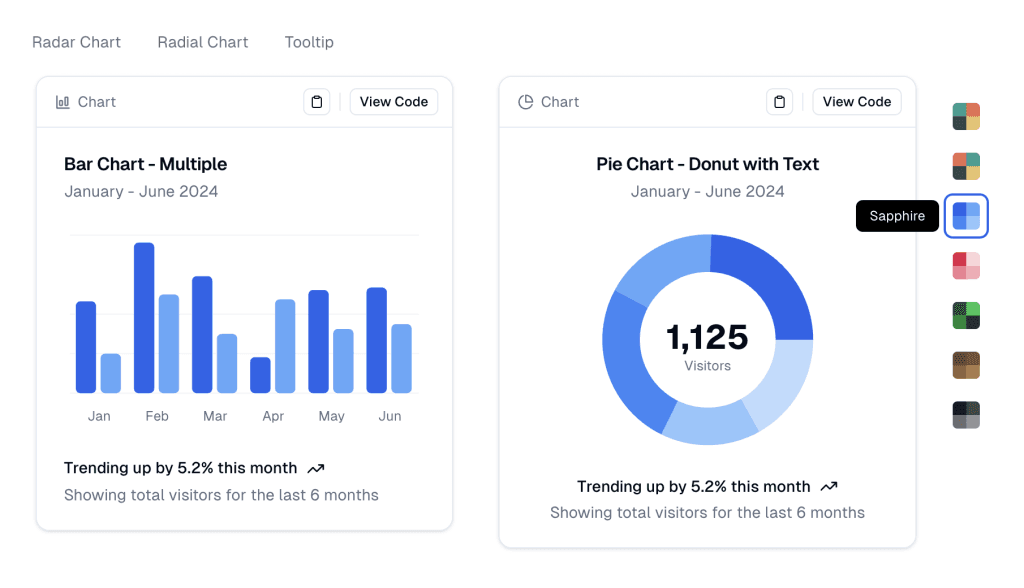
The key challenge was that I couldn’t write any code myself. Everything had to be achieved solely through prompts in Cursor Chat or Composer.
Results
Initially, the AI attempted to create a front-end style variation switcher that directly modified the site’s applied style variation. However, this approach wouldn’t work for logged-out users and wasn’t what I had in mind. In hindsight, my prompting could have been clearer.
Next, I encountered issues with the Twenty Twenty-Five theme and how style variations are returned by WP_Theme_JSON_Resolver::get_style_variations(). There isn’t a clean way to differentiate between full-style variations, color-only variations, and typography presets. This wasn’t a problem with the Twenty Twenty-Four theme, as it only has full-style variations. Resolving this took some time, but it wasn’t the AI’s fault.
After sorting out the style variation challenges, we faced issues with fonts. Each style variation includes its own fonts, which are not loaded by default—only the fonts used in the currently applied style variation are loaded. With repeated prompting, the AI eventually managed to resolve this.
While the fonts were loading, additional edge cases emerged, such as section styles and duotone effects provided by certain style variations. Although I’m confident we could have resolved these with more time, I decided to simplify the scope by focusing only on color-only style variations. This approach was closer to the Shadcn UI example and I didn't want to spend too much time on this experiment.
Finally, I asked the AI to clean up the front-end UI to match the example (I pasted the screenshot above into Composer), and here’s the result:
The complete code is available in the GitHub repository. AI even generated the readme.md file and wrote the repository description.
While this is highly experimental and the plugin requires significant work before it could be considered production-ready, I was quite satisfied with the results after about an hour of prompting.